
Windows Search Too Slow? This Free Tool Can Find Almost Any File in Seconds
Everything Windows, VoidTools Everything, Windows Search, Windows 11 tips, Windows 10 tips, file search, PC tips, productivity tools, free Windows software
If you've ever spent several minutes looking for a file on your Windows laptop, there's a small free tool you should know about. It's called Everything, and despite the slightly unusual name, it does one thing extremely well:
It finds files and folders incredibly quickly.
Unlike the normal Windows search experience, Everything builds a database of your file and folder names and lets you search through them almost instantly. VoidTools says indexing a fresh Windows installation with around 250,000 files can take only a few seconds.
For students, developers, content creators and professionals who have thousands of files scattered across their laptops, this can be a huge time saver.
What is Everything?
Everything is a lightweight Windows search application developed by VoidTools.
It indexes file and folder names and paths, allowing you to type part of a filename and immediately see matching results. It also monitors filesystem changes so the results can stay updated in real time.
For example, suppose you remember that you saved a document called:
Afritechconnect_Article_2026.docx
but you have no idea where you saved it.
Instead of manually opening Documents, Downloads and other folders, simply open Everything and type:
Afritechconnect
The matching file should appear immediately.
How to Install Everything
Go to the official VoidTools website and download Everything for Windows.
Download Everything from VoidTools
There are installer and portable versions available, including 64-bit options.
After installation, Everything will build its initial index.
Once that is complete, you're ready to search.
How to Find a File
The simplest method is just to type part of the filename.
For example:
invoice
Everything will display files and folders containing "invoice" in their names.
You don't need to remember the complete filename.
You can search for:
report
photo
resume
invoice
project
video
database
and narrow the results from there.
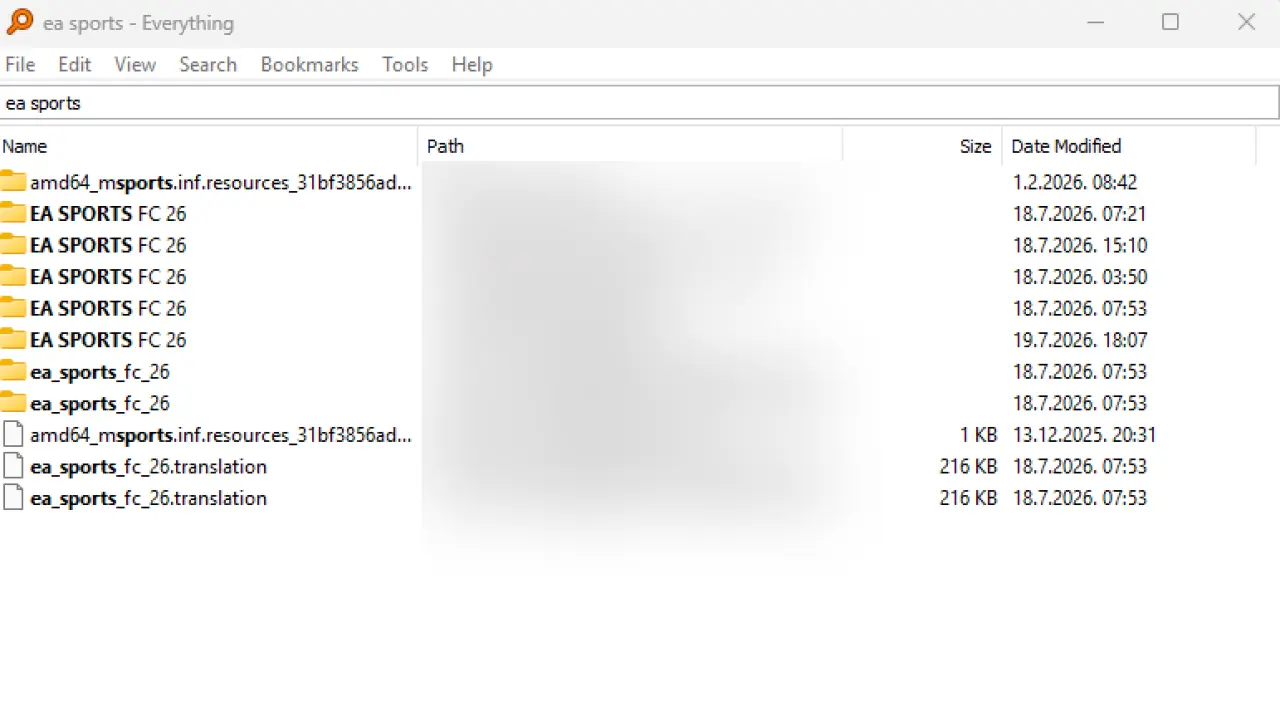
Search for Specific File Types
This is where Everything becomes even more useful.
Want to find every PDF?
Type:
Want all Excel files?
*.xlsx
Want every MP4 video?
*.mp4
Want photos?
*.jpg |
*.png
The | operator means OR, so the last search returns JPG or PNG files.
Find Recently Modified Files
This is particularly useful for developers and content creators.
You can search:
dm:today
to find files modified today.
Or:
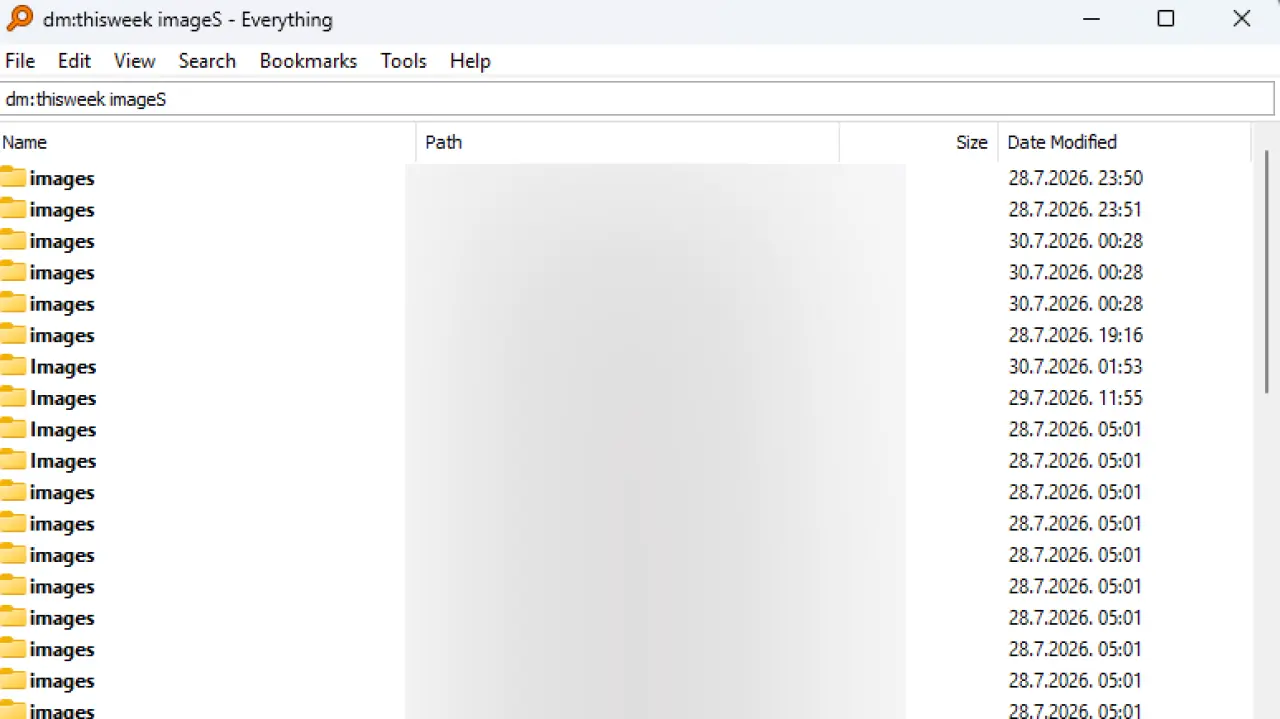
dm:thisweek
to find files modified this week.
Imagine you've been editing several files but can't remember which folder you saved them in.
This can save you a lot of searching.
What About Searching Inside Documents?
There's an important distinction here.
Everything is primarily designed to search file and folder names, which is why it is so fast.
It can also search file contents using the "content:" function, but content searching is considerably slower because file contents aren't handled the same way as the filename index.
So if you're trying to find:
Which document contains the phrase Lagos State University?
that's a different type of search from:
Find the document named Lagos University.
For the second task, Everything is extremely fast.
Why African PC Users Should Know About It
For many students, freelancers and small businesses across Africa, laptops aren't always equipped with huge SSDs.
It's common to have:
Downloads + WhatsApp files + school documents + client projects + videos + installers + photos
all accumulating on the same machine. After a few years, finding one particular file can become frustrating. Instead of spending money on another storage-management application, Everything is a simple free tool that can make your existing Windows laptop much easier to use.
It's especially useful if you work with large numbers of files.
Final Verdict
If you're using Windows and regularly find yourself saying:
I know this file is somewhere on my laptop.
install Everything.
It's free, lightweight and extremely fast at what it was designed to do: locate files and folders by name.
And once you learn a few search commands, you can go from searching through thousands of files manually to finding what you need in seconds.
Sometimes the best productivity tools aren't complicated. They're just tools that save you from doing the same annoying task every day.
Advertisement
Responsive
Related Articles

iPhone Overheating in Nigeria? Causes, Fixes and When to Worry
Is your iPhone getting hot in Nigeria? Learn why your iPhone overheats, how hot weather, charging, gaming and apps contribute, and what to do before it becomes a serious problem.

Samsung Galaxy S27 Ultra Camera: First Look, Leaks & What We Know
Samsung Galaxy S27 Ultra camera leaks are already creating excitement. Here's what the latest reports suggest about its camera design, sensors, zoom and possible upgrades.
How to Change Your iPhone or Android GPS Location for Free 2026 Guide
Want to spoof your GPS location on iPhone or Android? Learn how to change your phone's location for free using 3uTools, why it may stop working on newer iOS versions, and when a paid tool like MocPOGO may be worth considering.

MacBook Screen Goes Black When You Open It Wide? It Might Not Be the Motherboard (Flexgate Explained)
If your MacBook screen works only at certain angles or goes black when you open the lid fully, you may be dealing with the Flexgate display issue—not a motherboard fault. Here's what you need to know before paying for repairs.

Hidden Glo Data Trick in 2026: Get 10GB for Just ₦2,000 That Most Nigerians Don't Know About
Discover Glo's hidden data plans available only in the Glo Café app. Learn how to get 10GB for ₦2,000, compare it with MTN and Airtel, and find out why it's one of Nigeria's best-value data bundles.
Build Your Own Local AI Agent in 2026: A Beginner's Guide for Africans
Learn how to run your own AI assistant locally using open-weight models like Qwen and Gemma with OpenClaw. Automate emails, documents, coding, and business tasks—even on budget laptops.

Starlink vs MTN FibreX (2026): Which Internet Should You Choose?
Comparing Starlink and MTN FibreX in Nigeria. We break down speed, coverage, installation, pricing, latency, gaming, streaming, and which internet provider is best for your home or business.
Advertisement
728x90
Comments (0)
Leave a comment
Comments cannot be edited or deleted after posting. Please review your comment before submitting.
No comments yet. Be the first to share your thoughts!